
The agent-native way to build WordPress sites fast, without ever breaking what’s live.
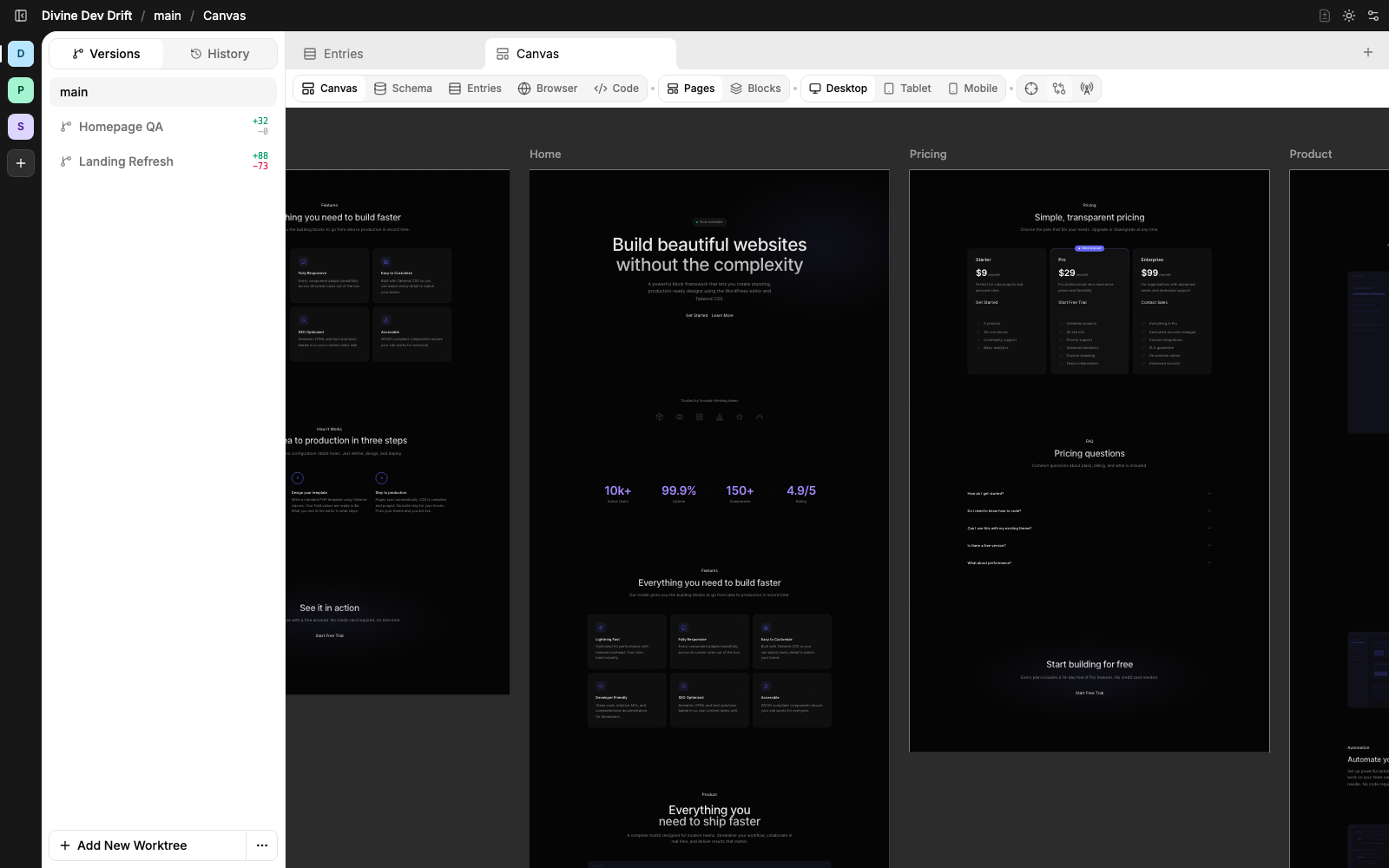
How Divine turns WordPress into a safe agent workspace.
Divine treats every WordPress theme as a protected source of truth. Agents work inside isolated git worktrees, preview changes safely, and the live theme only changes after review.
Connect a theme
Each Divine project is a real WordPress theme with templates, blocks, assets, and schemas.
Keep the live theme protected
Agents never edit the live theme directly.
Create a worktree
Divine creates a separate theme copy backed by git, with its own isolated preview state.
Scope MCP access
MCP gives the agent a scoped worktree id, so every command runs inside the assigned copy.
Preview in place
Preview worktree pages, schemas, and entries without touching the live theme. Everything stays worktree-local until you merge.
Review, then merge
When the diff is ready, Divine shows what changed and promotes it back to the live theme only after review.
The Divine model: app, worktree, live theme.
A Divine app is one of your WordPress themes, registered as a workspace. Worktrees are isolated copies of that theme, one per task. The live theme is what visitors see on the site.
App
Your registered theme. Holds the source of truth, the schemas, and the deploy target.
Worktree
A scoped, git-backed copy of the app theme. One worktree per task. Agents work here.
Live theme
What’s served to visitors. Only changes after a worktree is reviewed and merged back.
MCP at the center of the workflow.
Create a worktree in Divine, hand an MCP-capable agent a scoped bearer token, then let it work through one controlled command surface while you keep final review and merge control.
					# Human operator lifecycle
					App selected: divine
					→ registered WordPress theme app
					New worktree: hero refresh
					→ worktree_id wt_8f3a2b1c
					→ isolated WordPress preview URL ready

							MCP token: Claude
					→ bearer token bound to divine
					Endpoint: divine mcp.php
					→ give endpoint, token, and worktree id to the agent

							Merge worktree: wt_8f3a2b1c
					→ merge only after human review
					# Agent MCP session
					initialize
					→ Divine MCP 0.1.0
					load_resources divine://guide/theme-authoring
					→ theme authoring rules loaded

							# Bash composes the work in one execute
					execute "rg -l hero pages | xargs git diff --stat"
					→ pages/home/index.php | 12 +++++---

							# Worktree-bound wp piped through bash
					execute "wp post list --format=ids | wc -l"
					→ 47

							execute "git diff --stat"
					→ only worktree files changed
					→ review in Divine before merge
Works with every MCP-capable agent.
Divine gives every MCP-capable agent the same scoped worktree, the same controlled command surface, and the same handoff back to your review. Pick the agent you like.
Agent-authored, editable in WordPress.
Divine creates editable WordPress blocks that open in the standard block editor. Content edits sync back into theme files, so pages stay version controlled instead of disappearing into the database.
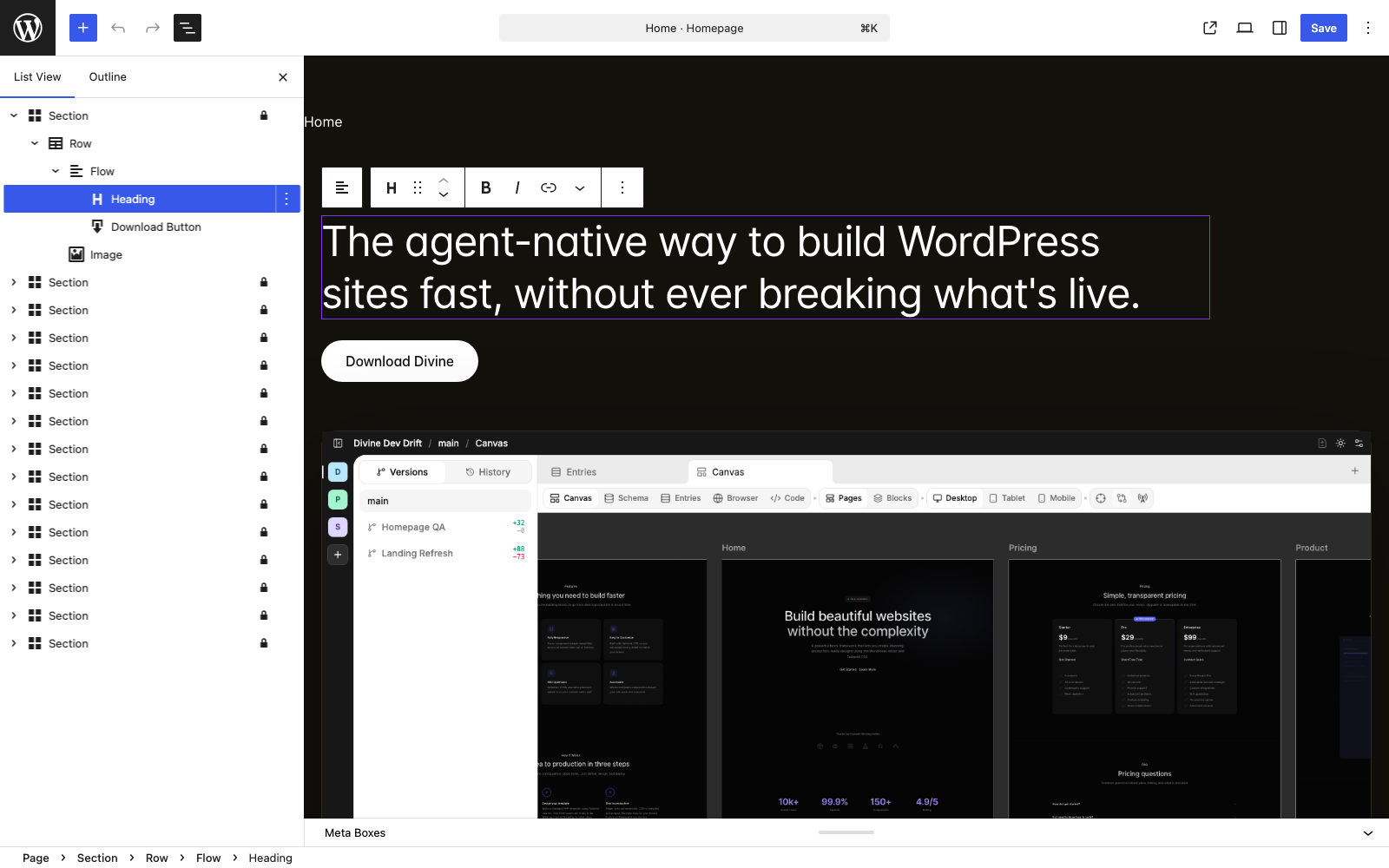
Readable for agents. Editable for clients.
Agents write semantic page structure with familiar elements. Divine maps that structure into editable WordPress blocks, so the editor stays visual while the source stays clean.
					pages/home/index.php

							<section>
					  <div width="wide" class="flex flex-col items-start gap-14">
					    <div gap="1.5rem" class="max-w-5xl">
					      <h1 class="h1">Built to make coding agents extraordinarily productive, Divine is the best way to build with WordPress.</h1>
					      <block name="divine-homepage/download-button" size="lg" />
					    </div>
					    <img src="assets/images/divine-screenshot.png" alt="Divine canvas showing Drift pages inside the main worktree" class="image" eager="true">
					  </div>
					</section>

							→ section, heading, button, and image become editable blocks
Canvas, code, data, review. One workspace per task.
Divine brings rendered preview, scoped code edits, structured data, and git review into one WordPress-native workflow.
Canvas
Inspect rendered pages and blocks exactly as WordPress outputs them.
Code
Inspect and edit the theme files behind the page without leaving the builder.
Data
Shape schemas and entries alongside the templates that render them.
Review
Compare worktrees against the live theme before changes are merged.
Schemas and entries agents can reason about.
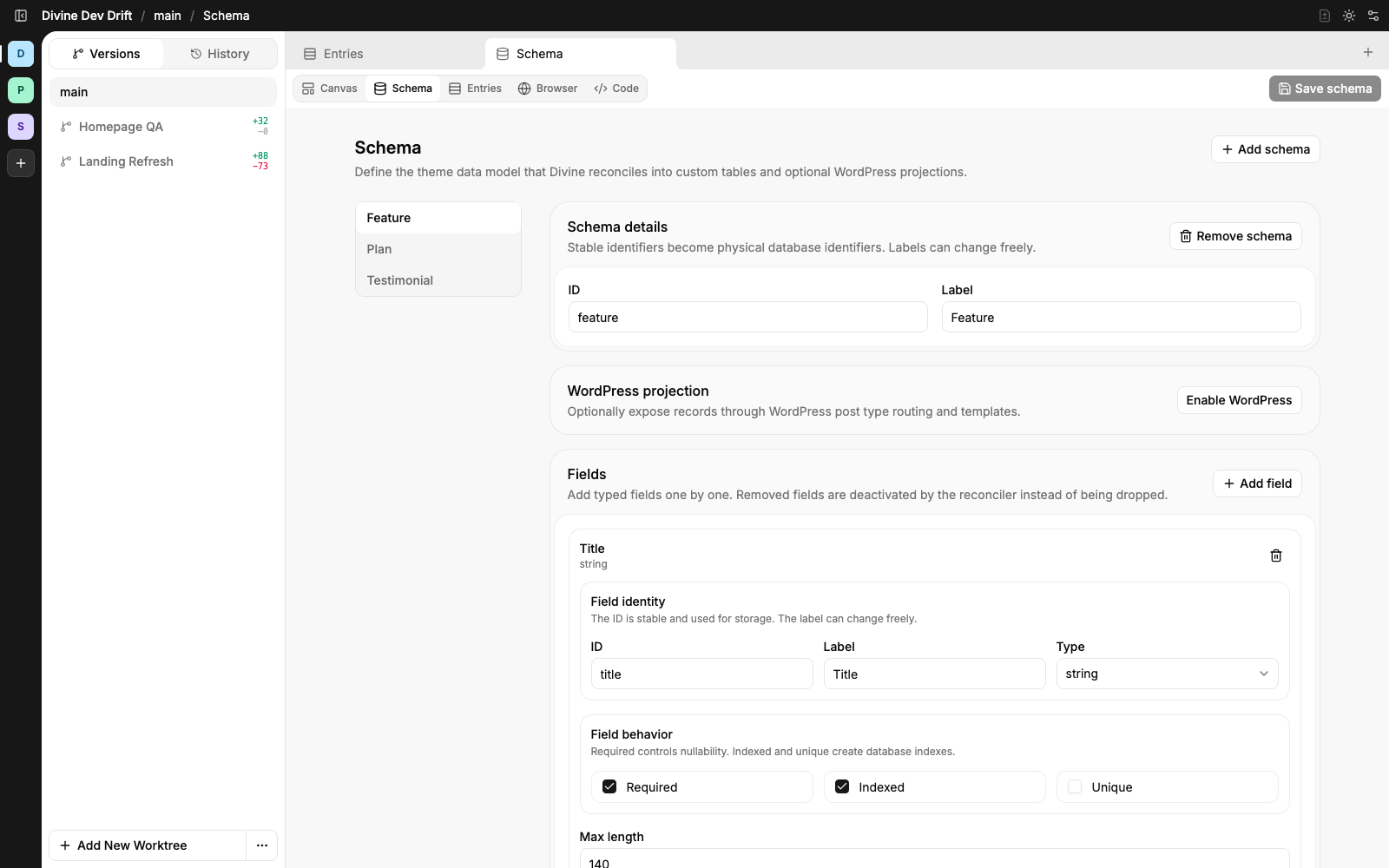
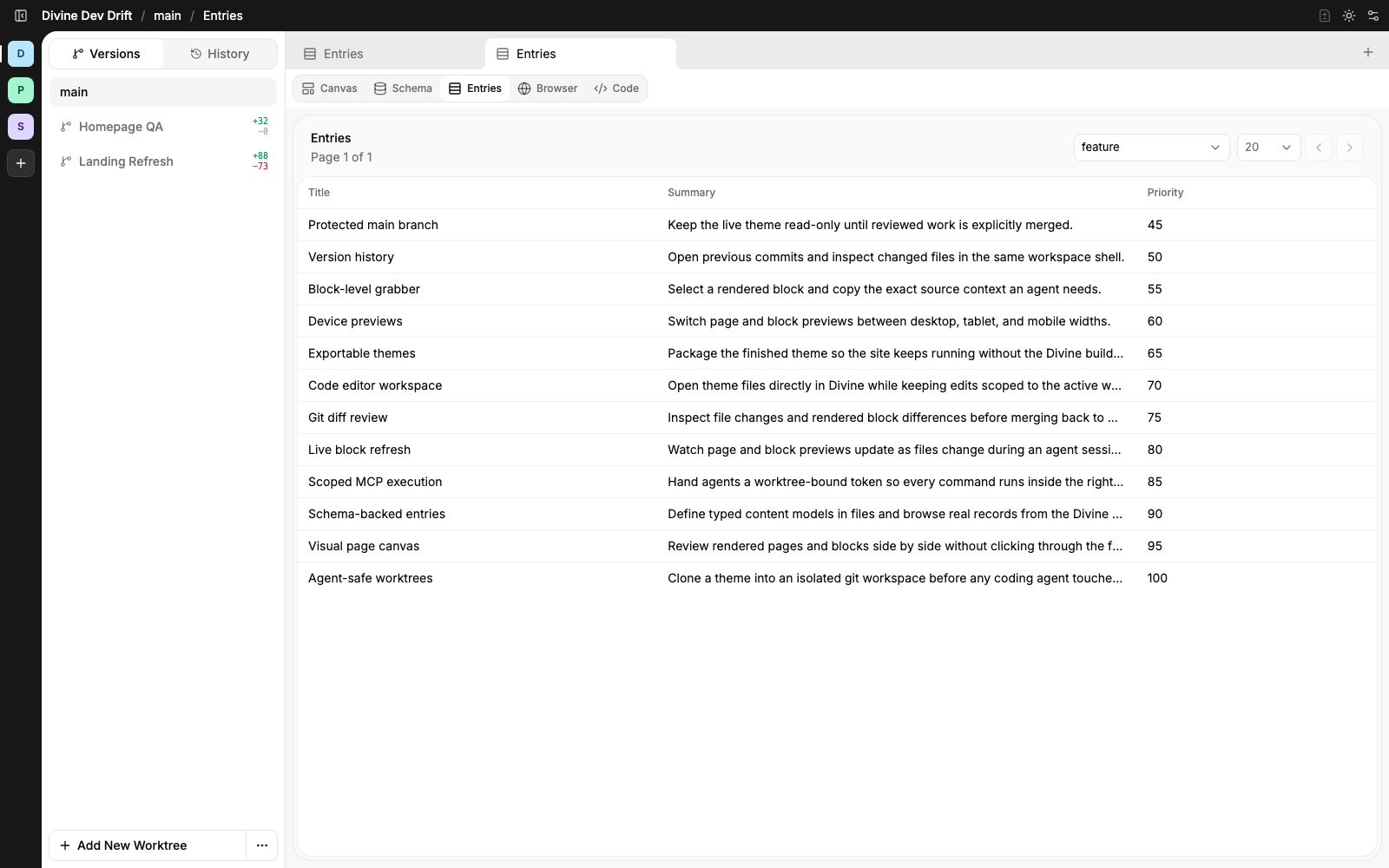
Define structured content in files, browse real records in Divine, and give agents typed data instead of forcing them to infer meaning from post meta. Schema changes and entry edits stay in the worktree’s preview namespace until you merge. Your live entries don’t move until you say so.
Schema
Entries
File-backed schemas
Schemas live with the theme, so data shape changes are reviewed and version controlled.
Real entry tables
Entries are visible in Divine as structured rows with schema-specific columns.
Theme-aware data
Agents can update templates and content models in the same scoped worktree.
From code change to reviewed merge.
Agents edit scoped theme files in a worktree. Divine keeps the source visible while they work, then turns the result into a reviewable diff before the live theme changes.
Start with the actual theme files.
Open the template, block, schema, or asset the agent is changing. Main stays readable, while worktree tabs become the place where scoped edits happen.
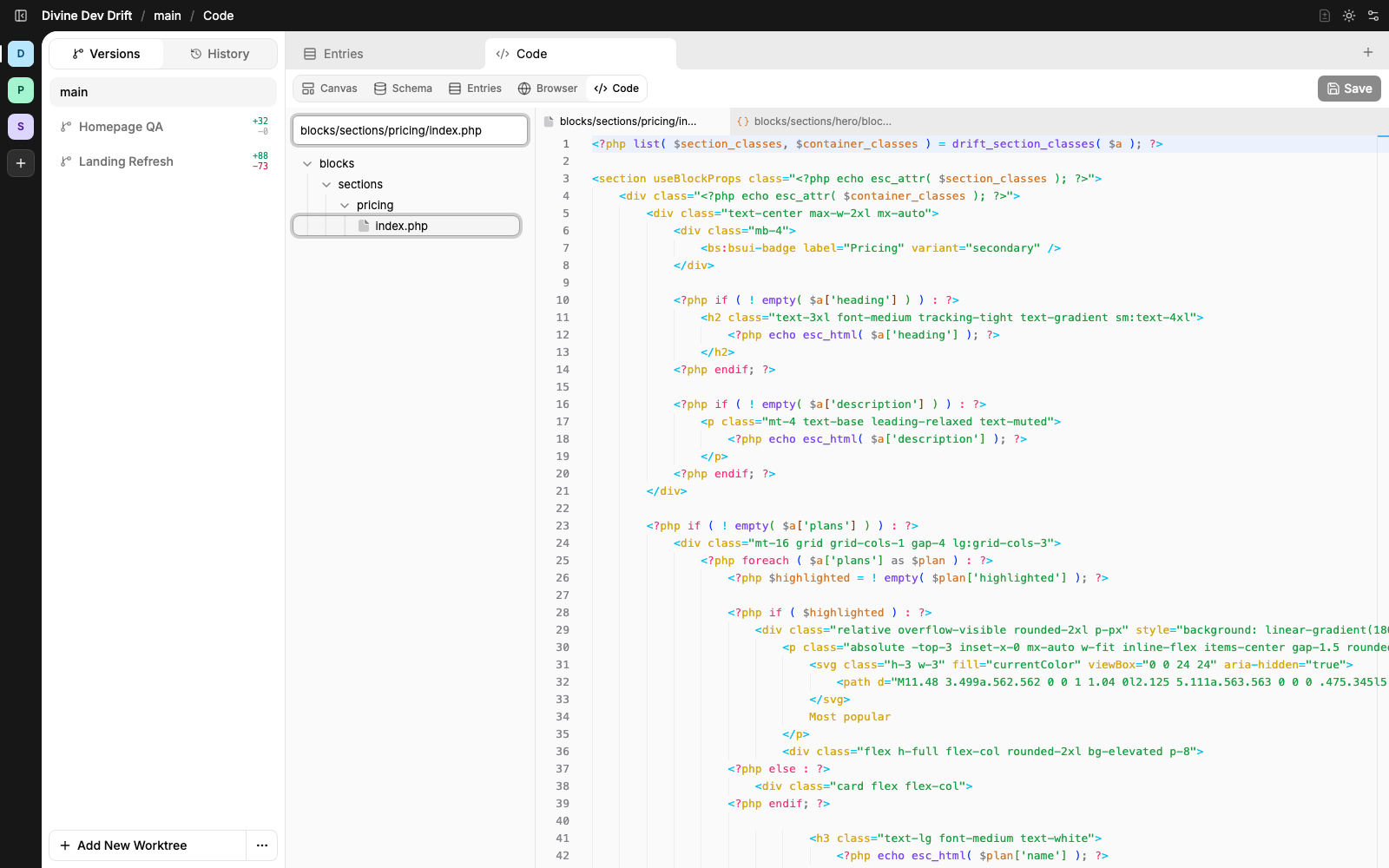
Theme files in context
Browse the same theme structure agents edit through MCP, directly inside Divine.
Scoped code editor
Open multiple files and keep the active tab remembered with the current workspace.
Only worktrees are writable
Main can be inspected safely. Edits happen in worktrees before review and merge.
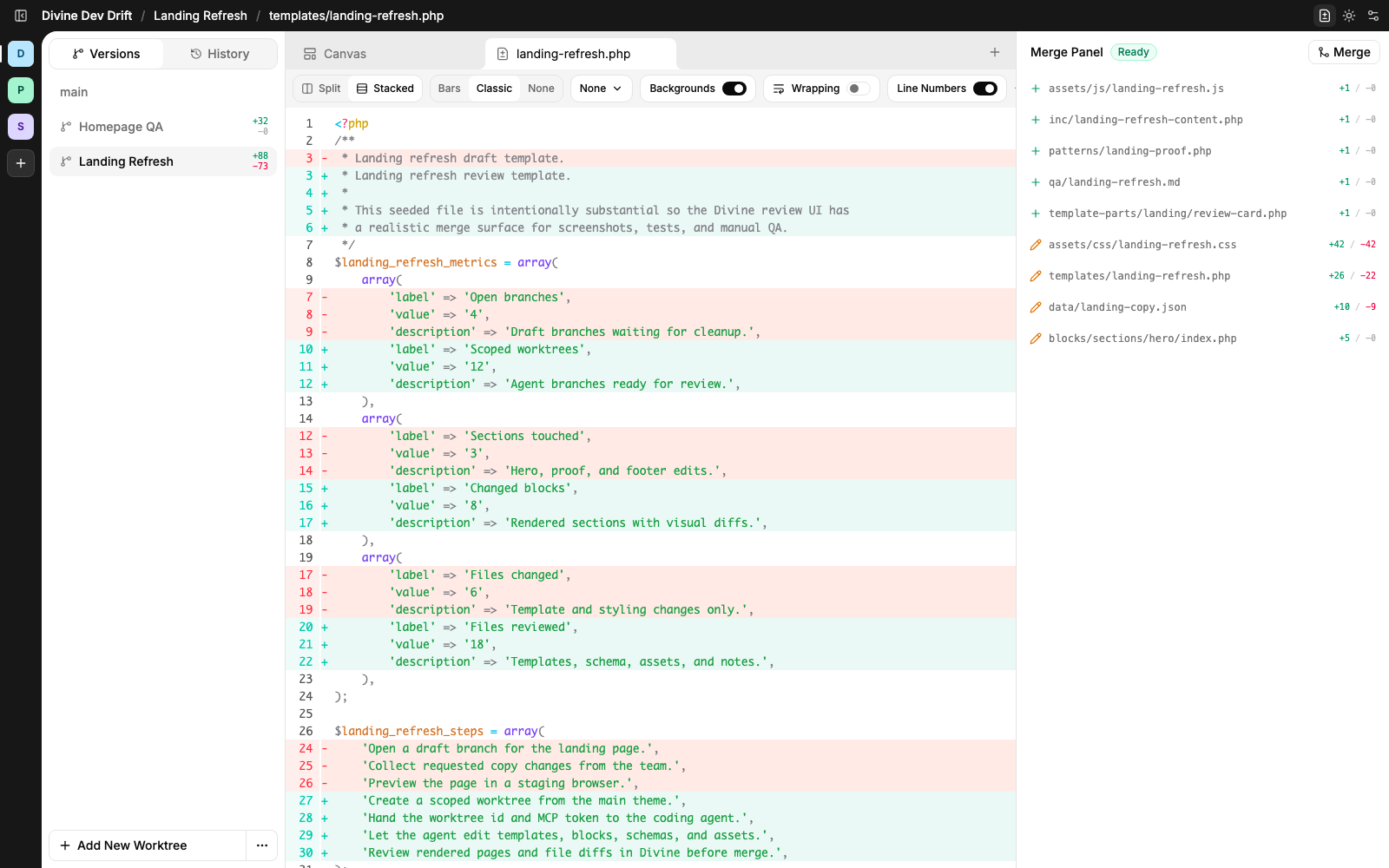
Then review the finished worktree.
When the agent is done, Divine turns the worktree into a file-by-file review surface so you can inspect the exact diff before merging anything back to the live theme.
Full file diffs
See template, style, script, data, and QA changes in one review surface.
Changed files stay visible
The merge panel keeps the full worktree scope visible while you inspect a file.
Merge is explicit
Main only changes after a human reviews the worktree and chooses to merge.
Your first task in five steps.
Divine is built around a deliberately small operator loop. The same flow works for a hero refresh, a new schema, or a full landing rebuild.
Connect a theme
Register your WordPress theme as a Divine app.
Create a worktree
Name the task. Divine makes a git-backed copy.
Hand off the token
Give the agent the worktree id and an MCP token.
Watch the work
Preview the worktree as it changes. Check fires after every write.
Review and merge
Inspect the diff. Promote to the live theme when you’re satisfied.
Familiar WordPress underneath. Agent-native workflow on top.
Divine keeps the parts of WordPress that already won: the editor, themes, templates, post types, and publishing model. Then it adds the layer agents need to work safely inside that structure.
WordPress-native editing
Pages remain editable in the block editor, with full page editing and normal template behavior still intact.

Old foundation. New workflow.
Reliable WordPress structure with an agent-native control layer on top.
Agents get a safe lane
MCP, scoped worktrees, previews, and reviewable diffs give agents room to work without touching the live theme directly.
Schemas map to WordPress
Structured schemas can connect to custom post types, so archive and single templates stay part of the WordPress model.
Heavy data stays fast
Large structured records can move into custom data tables instead of forcing everything through post meta.
The stack behind the loop.
Divine is built on focused tools made for this exact workflow: files become blocks, PHP-native git worktrees become safe review surfaces, and PHP-native search stays fast enough for agents to navigate real themes.


Built for the people who ship WordPress sites.
Divine fits anywhere a coding agent could move work forward without putting the live site at risk.
Agencies
Hand each client site a scoped worktree per task, with review before anything reaches the live theme.
Solo developers
Move faster on marketing pages, schema work, and theme refactors with an agent doing the typing.
Content-heavy sites
Schemas, custom tables, and post-type templates stay typed and reviewable, even as the model grows.
What you need to run Divine.
Divine installs as a normal WordPress plugin. No multisite, no managed hosting, no wp-config edits required for the default lane.
WordPress 6+
Any single-site WordPress install at version 6 or later.
PHP 8.2+
Modern PHP with strict types. The runtime targets 8.2 and above.
Works on shared hosting
Every layer of Divine’s runtime is pure PHP: bash, search, git, wp, and the Check validator. No proc_open or exec required, so Divine works on locked-down hosts.
Free for self-hosted
The single-site lane is free. Multisite and hosted are Pro.
Questions before you give WordPress to an agent.
Divine is designed to keep WordPress familiar while making agent work reviewable, scoped, and reversible.
No. Divine runs with WordPress and keeps the editor, themes, templates, post types, and publishing model intact. It adds a safer agent workflow around them.
Yes for self-hosted single-site WordPress. Divine ships as a normal plugin with the free lane enabled by default. Multisite and hosted infrastructure are Pro.
No. The live theme stays protected. Agents work inside isolated git worktrees, and changes only reach the live theme after review and merge.
No. Divine exposes an MCP surface, so any MCP-capable agent can work with the same scoped context and command access.
Yes. Every layer of Divine’s runtime is pure PHP: the bash interpreter, search, git, wp, and the Check validator. No subprocess execution required, so Divine works on hosts that disable proc_open or exec.
Yes. The WordPress block editor edits main pages directly. Worktree pages live as files and preview inside Divine. When a worktree is merged, its files become block editor pages on main.
Validation isn’t a step they have to remember. Divine ships its own static analyser, written in PHP for the theme contract, and it fires automatically after every worktree write. Findings come back inline, so agents see structural mistakes the moment they happen and can’t ship broken contract code.
Schemas give agents typed structure they can reason about. Heavy records can live in custom tables while still connecting back to WordPress post type and template behavior.
Divine shows the changed files and diffs. A human reviews and explicitly merges files back into the live theme. Deploy is file-only. Main reconciles its own schema from the merged files, and preview entries from the worktree don’t get copied over.
Broader agent compatibility, deeper schema tooling, and richer review surfaces. The control plane stays small on purpose: lifecycle on wp dv, execution on MCP, review in the builder.
Ready to build with agents?
Build with coding agents you can trust.