
A WordPress change loop that keeps your live theme safe.
Divine separates the live theme from the work an agent is doing. Every task gets its own git-backed worktree, so changes can be previewed, reviewed, and merged without letting the agent touch the live theme directly.
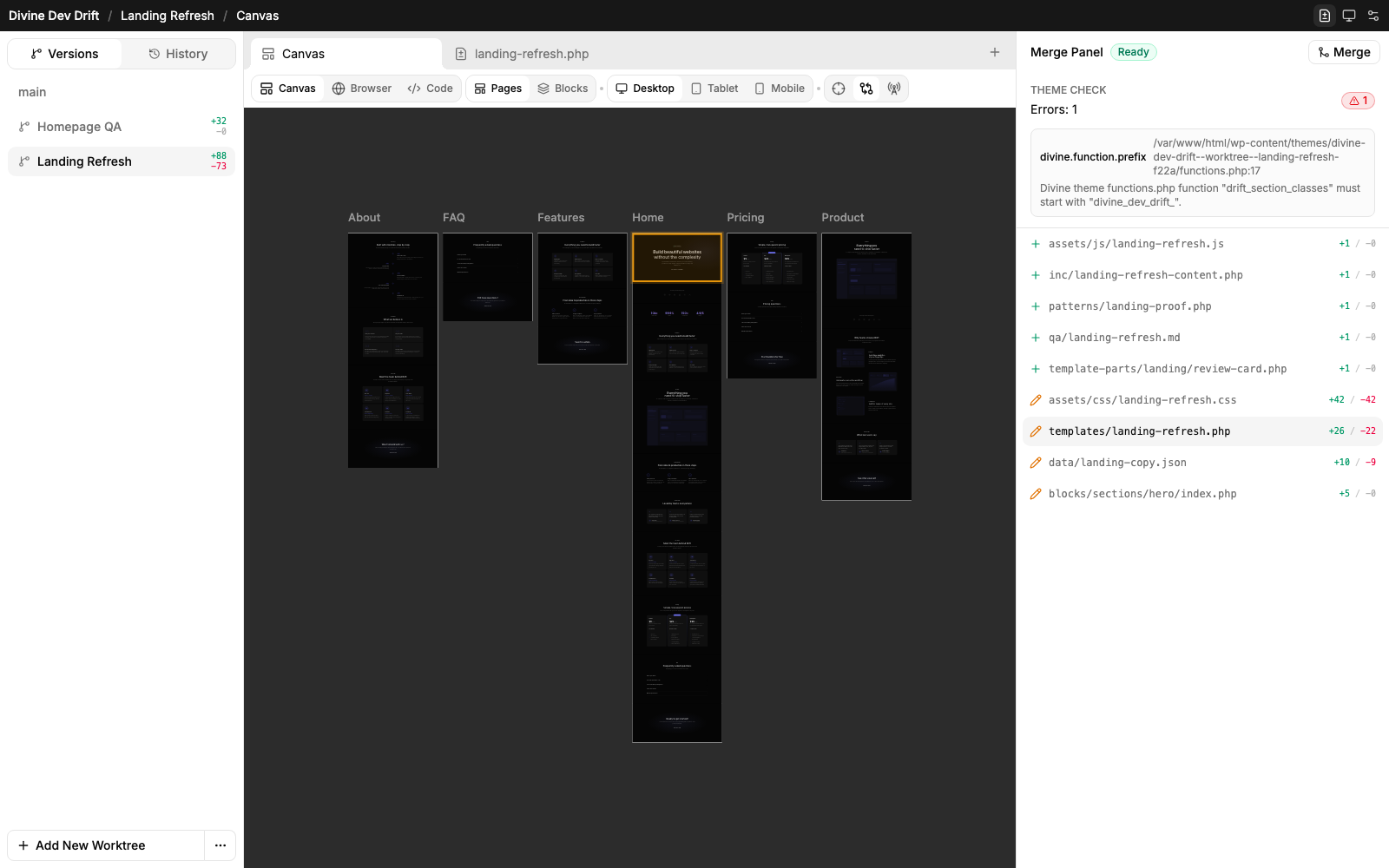
One task, one isolated theme workspace.
The workflow is deliberately narrow. Each task branches its own worktree off main, the agent works only there, and the live theme stays put until a reviewed merge brings the change back.
Start from the theme
Templates, blocks, pages, assets, and styles stay in a normal WordPress theme.
Create the worktree
Divine branches a full git-backed copy of the theme for the task, with its own preview state.
Scope the agent to the task
The agent works against one worktree id, inspecting files, editing blocks, and updating pages inside that task only.
Validate the worktree
Check parses every write in pure PHP. Broken theme structure flags before it reaches review.
Iterate safely
If the result needs adjustment, the agent keeps working in the copy while the live theme remains untouched.
Merge after review
The worktree becomes a file-by-file review surface. Main changes only after approval, then the worktree is removed.
The agent sees a task boundary, not an open-ended admin.
Divine turns broad WordPress work into a narrow runtime contract. Commands execute in the selected worktree and the UI keeps the boundary visible.
					# Human starts a scoped task
					select_app divine-dev-drift
					→ main is readable
					create_worktree "landing refresh"
					→ worktree ready
					hand the worktree to an agent
					→ it can edit only the copy
					# ready for review in Divine
					→ inspect diff before merge
					# Worktree result
					divine-check blocks pages
					→ no findings
					git diff --stat
					→ pages/divine/home/index.php | 12 +++++---
					→ blocks/hero/index.php | 8 ++++--
					# ready for review in Divine
					→ inspect before merge
What the live theme is protected from.
The boundary is structural, not advisory. The agent works in an isolated copy, the live theme is never written directly, and only a reviewed merge moves files back.
No edits to the live theme
The agent has no write path into the active theme. Files outside the worktree are read-only or invisible.
Worktree-scoped edits
File edits are confined to the worktree directory. The live theme and other apps stay out of reach.
File-only deploy
Deploy mirrors files back into the theme. It never touches posts, options, uploads, or the database.
Hookless git
Git runs without hooks, so a worktree cannot trigger arbitrary scripts on the host.
No site secrets
An agent only gets the worktree copy. Site credentials, keys, and other tasks stay out of reach.
Review before merge
Worktree changes only reach the live theme after a human reviews the diff and chooses to merge.
Review is part of the workflow, not an afterthought.
The worktree that made a change also shows you everything behind it. Read the diff for a block, a page, an asset, or a template, then promote it. Nothing reaches the live theme until you say yes.
Mark changed blocks
Canvas highlights changed rendered blocks so visual review starts where the work happened.
Open exact files
The merge panel lists every changed file with additions and removals.
Keep context visible
Preview and review sit side by side instead of forcing a switch to another tool.
Discard safely
If the direction is wrong, remove the worktree and the live theme remains unchanged.
Give agents a safe lane through WordPress.
Worktree first. Preview second. Review before merge.